Personal flight logbook · Interactive map · Shareable stories
Your flights, beautifully organized.
Track flights, visualize every route on an interactive map, export journeys to stories, and dive into smart statistics.


Everything you need for your journeys
A comprehensive suite of tools designed by travelers, for travelers.
Smart Logbook
Add flights in seconds with airline, flight number, aircraft, and seats. Intuitive design makes logging a breeze.
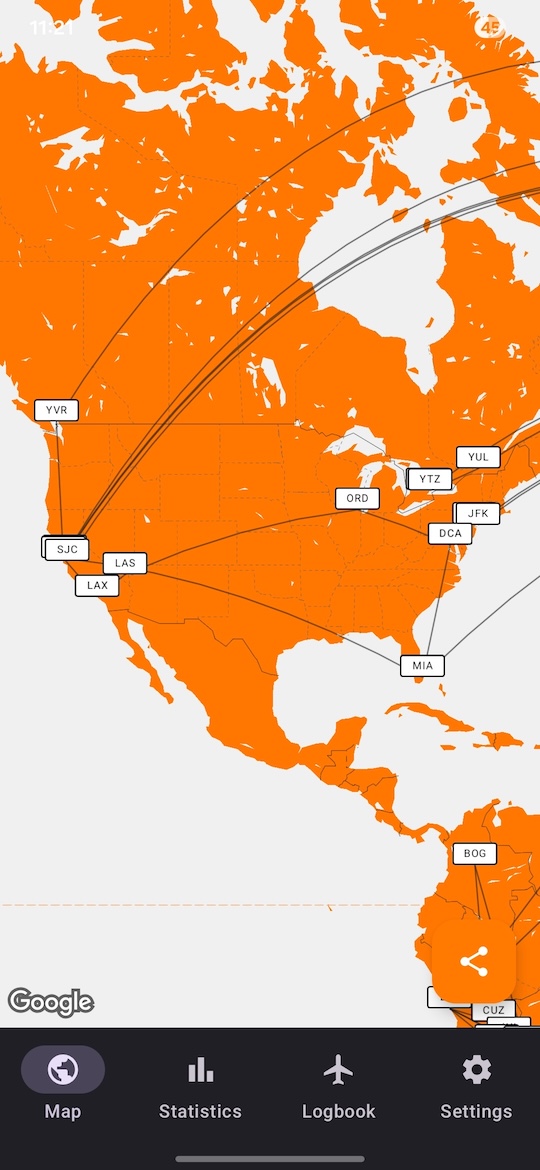
Interactive Map
Explore a detailed world map highlighting every route you've ever flown.
Export to Stories
Generate crisp, story-ready images of your journeys to share your travel stats with friends and on social media.
Meaningful Stats
Dive into your journey data: airports visited, distance flown, time in the air, and many more custom metrics.
Frequently Asked Questions
Does AirJourneys work offline?
Once your data is loaded, you can log new flights, view your map, and check statistics even without a signal. However, functions that rely on external data, like automatic flight detail lookup, will only work when you're connected.
Can I export my data?
Absolutely. We believe your data belongs to you! You can easily export your full flight log and statistics in common formats like CSV and JSON. This gives you a convenient way to back up your data or analyze it further outside the app.
Which platforms are supported?
AirJourneys is currently available on the Google Play Store for Android devices. We are actively working on the iOS version and plan to launch on the Apple App Store very soon. Join our waitlist to be notified instantly!
Is my data stored on your servers or shared with third parties?
Your privacy is our top priority. We do not sell, or rent your personal flight data with any third parties. Your flight logs are securely stored on your device. We only use anonymized, aggregated data (like total flights logged across all users) for internal analytics to improve the app. Please see our Data Privacy Policy for full details.
I got wrong data after using the flight auto-import. Why?
The challenge with automatic flight lookup is that airlines sometimes reuse flight numbers over time or across different routes (e.g., a number used today for a London flight might have been used last week for a Paris flight). If you encounter incorrect data after using the autofill feature, it's usually because the system pulled an older or alternative flight utilizing the same number. We strongly recommend always giving your flight details a quick double-check before saving to ensure everything is accurate!
Get in Touch
Have questions, partnership inquiries, or need support? We're here to help you.
contact@airjourneys.app